
Add UserWay’s Accessibility Widget
To make your Domain Shop or custom for-sale landing page more inclusive and ADA-compliant, you can easily add UserWay’s Accessibility Widget
Why accessibility matters
The Americans with Disabilities Act (ADA) protects the rights of people with disabilities and ensures equal access to services.
In today’s digital world, online accessibility is just as important as physical accessibility.
By maintaining an ADA-compliant marketplace, you:
- Ensure your website is usable by everyone.
- Build trust and credibility with buyers.
- Reduce the risk of accessibility-related complaints or fines.
About UserWay
UserWay is the leading web accessibility solution used by millions of websites worldwide.
Its Accessibility Widget automatically detects and fixes accessibility issues on your site, helping you meet compliance standards and improve user experience.
UserWay offers both a free and a paid version:
- The free widget provides user-triggered accessibility enhancements.
- The paid widget offers automatic code-level fixes and more customization options.
How to set up UserWay in Efty
-
Create a UserWay account
Go to Userway.org/signup and sign up for a free or paid plan.
-
Get your widget embed code
After signing up, you’ll receive a JavaScript code that looks like this:
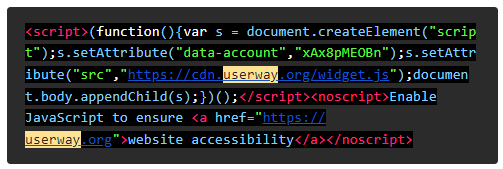
- Add the code to your Efty account
- Go to Settings > Domain Shop in your Efty dashboard.
- Paste the script into the designated field.
- Click Save.
-
Check your Domain Shop or landing page
The widget should appear immediately on your Domain Shop or custom for-sale landing page.
You can further customize its appearance and behavior from your UserWay account.
You’re all set!
Your Efty Domain Shop or for-sale landing page is now equipped with an accessibility widget that helps ensure a better experience for all visitors, while maintaining your business's compliance and professionalism.